A related question: how to get the deepest-red frequency on the monitor (while reducing the interference from other frequencies)?
The first step would be to use red color (let's say, RGB=0xff0000).
Is there anything to do to lower the frequency? Would reducing the brightness help?
Or is it just simply: set it to full-red, full-brightness?
The core constraint is the ability of any particular monitor to product light at these wavelengths. In simple terms, LCD panels often shine a white backlight through a panel with separate red, green, and blue filters for every pixel. A fully-white image, then, should have the broadest spectrum possible for a specific screen. Apply a pure red image, e.g. 0xFF0000, will selectively filter the spectrum to mostly eliminate the green and blue wavelengths, but depending on the filtering material may also eliminate longer wavelengths too.
Edited to add:
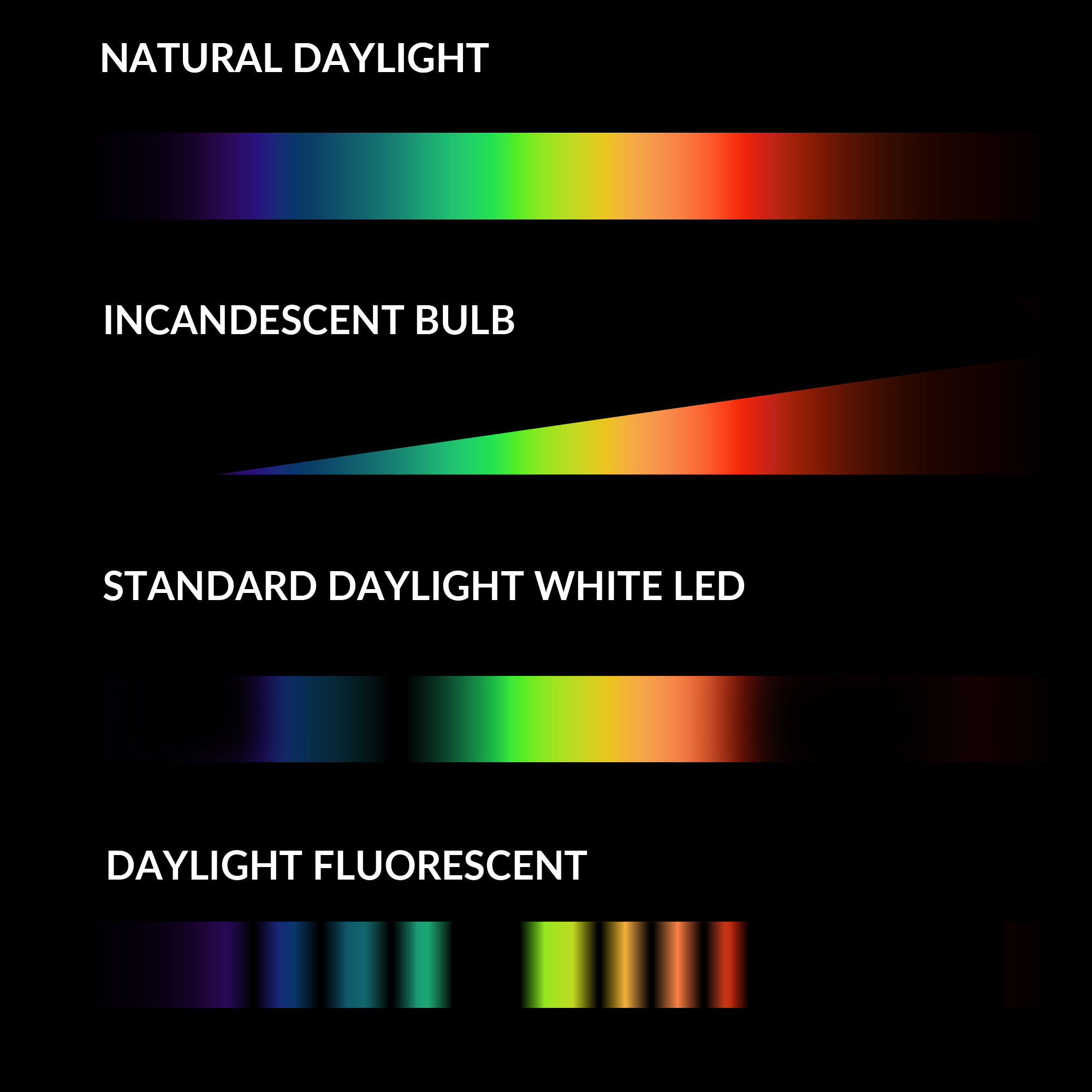
This graphic [1] illustrates the spectrum produced by common light sources. Old LCD panels used fluorescent backlights like the bottom example. More recent LCD panels often use an array of LED backlights. The bottom line is that, if you're trying to maximize red light exposure, you're much better off with: sunlight >> incandescent bulb light > a very "warm" LED light.
It depends on what emits light in your monitor. Backlight (led/fluorescent tube)? OLED? Electron fluorescense in CRTs? Quantum fots?
Usually red emission is wanted close to red cone sensitivity peak (actually a bit redder than that, as green cones are quite close). So about 600 to 650 nm.