If consumers are unwilling to shell out for a TV priced high enough that the manufacturer doesn't need to do things like this to earn a (decent) profit, then what we've got is what you get.
You could certainly argue that the industry should've held the line, but that ignores human nature. One "innovative" manufacturer was always going to break ranks then the rest would follow, especially since the typical consumer appears (judging by the lack of non smart TV's for sale at consumer prices) to prefer lower prices to lack of tracking features. I think people very much like being able to buy a 65" tv for USD399.
If you want to mandate the sales of TVs that don't track, get a law passed. I suspect it'd be deeply unpopular once the resulting price rises were known.
> If consumers are unwilling to shell out for a TV priced high enough that the manufacturer doesn't need to do things like this to earn a (decent) profit, ...
The problem is, even if the device is priced at cost plus a reasonable margin, they can make more margin by selling data that they acquire by spying. No matter the margin on the sale, there's still more money to make by selling that data. There is no upper limit that magically prevents the manufacturer from looking for other avenues to increase profit. "Premium" device priced 3x the "reasonable" price? Still more money to be made selling data.
Now, factor in the race to the bottom on selling price, and those data sales just look that much more enticing.
What do you mean? I don’t recall ever asking manufacturers if I could trade my privacy for a discount. I don’t remember that at all…people will pay whatever the price is, if inflation hasn’t taught that to you, then I’m not sure what to tell you. The other thing inflation showed us, is that manufacturers will absolutely put a price on what they feel is “decent profit.” Cmon dude. Do you not remember how much we paid for eggs?!
Which, i think it was found later to be that the manufacturers “manufactured,” “scam-bled eggs.”
You know, I’ve been thinking, I don’t think im being paid enough! Im giving myself a raise. We can do that, right?!
> Companies can develop new products without your advice. In fact consumers often don't know what they want.
I'd urge reading up on revealed preference and product discovery. It cuts both ways in that, sure, a company can offer a product on the market that no buyer asked for and have it sell well, but then, the media can expose some rather unsavory facts about that same product and subsequently (consequently?) have it not sell.
> Then why do businesses have sales? If prices don't matter why would businesses choose to make less money per sale?
It's worth picking this apart. Prices not mattering is usually expressed in economics-ese as price-inelastic demand, and that's usually not what's happening. Sales are a mechanism for drumming up demand for a product, with the hope that the additional volume will compensate for the marginally lower margin.
>I'd urge reading up on revealed preference and product discovery
I'm not sure what point you are contesting.
>It's worth picking this apart.
They were rhetorical questions.
>price-inelastic demand
With this you could argue that the absolute price does not matter, but the relative price between products that can substitute each other do. In this comment chain it is being argued that this kind of device wins on relative price.
>Sales are a mechanism for drumming up demand for a product, with the hope that the additional volume will compensate for the marginally lower margin.
It is for increasing demand, but making a higher rate of profit on the item is not the main reason. Things like being able to clear inventory, or to learn about what the current demand curve looks like (to know if prices should be adjusted) are more common purposes.
You're expecting consumers to be able to compare these anti-features that are actively hidden from them. It's like airline seats - airlines get away with continually shrinking them because consumers have no way to actually compare airline seat sizes ahead of time.
This stance is so anti-consumer it's laughable. Are you seriously implying LG doesn't turn a decent profit with their massive empire? There's an issue with capitalism of chasing infinite growth rather than stability, and this is one of the consequences of chasing such growth.
Maybe? If you assume a cell can just disappear at a moment's notice, then I'm guessing you don't even try backing it up. Whatever goes into and out of the cell (request logs and results) gets backed up, and no doubt that's more complicated than a monolithic system, but it may not be so bad assuming the replay systems and global transaction router do their thing?
This is pretty cool - especially that it's at the point where it can be used with a real window manager.
I'm curious why multiple screens is considered legacy baggage and thus out of scope, given how common multiple monitor setups are these days. I also have zero familiarity with X internals, so don't know if multiple monitor support is a horror show that'd be miserable to support.
I suspect(with out reading the source to find out) that screens are the traditional X11 screens as opposed to the modern xrandr combined screen.
Traditionally each screen in an X11 setup was it's own separate thing with it's own separate frame buffer. While technically applications could move between screens, this depended on the application caring enough to do so. It had to maintain two(or more) mirrored windows(one per screen) and keep them all aligned. So realistically no application did this.
The modern method of doing multi monitors on X11 involves one large virtual screen with each monitor assigned a section of it. This has downsides, for example; this is where the myth that X11 can't do mixed DPI setups comes from. But it has one huge massive overwhelming upside. The application does not have to be aware that there are multiple screens and multi monitor setups just work.
Just did a quick `xrand -q` to confirm I'm doing multiple DPIs, etc (cuz laptop and external monitor) on a single screen with 0 issues. Unless the physical misalignment of the monitors, which reflects as a vertical jump when moving the mouse pointer across the virtual boundary, can be considered an issue.
Old versions of GIMP (back when the toolbars etc. were separate windows) used to let you move any of its windows to a different X screen. And by "move" I don't mean drag - there was a menu where you could select the screen to move to.
I really miss the tear-off-into-their-own-window menus. They were so handy.
I have to wonder if the fact that Wayland either never had or has only very recently gotten support for applications that need to place their windows at application-commanded locations on the screen meant that those lovely tear-off menus had to die.
The gtk3 docs give the following reason for the deprecation:
Menus are not meant to be torn around.
Yeah, they are meant to be implemented with web technologies and look like shit.
BTW, this tear-off style is probably quite old. Long ago, I used an early version of ANSYS (for Windows) which apparently was still close to its Unix original, and it had its menus pop up like real windows, with close buttons! They were nicely cascaded, but one could rearrange them.
Yeah, I agree with that. I was using some ancient X11 program that had tear-off menus, but I'll be fucked if I can remember which one it is.
> Yeah, they are meant to be implemented with web technologies and look like shit.
Yuuuuuup. If you always take the "yes" side, you'll come out quite a bit ahead of your fellow gamblers for the "Will GNOME make things worse for sophisticated users and call it 'simplicity'?" wager.
They're really great on systems that let you hold a modifier key and then a mouse button to drag windows around... rather than requiring you to find the very-small-compared-to-the-size-of-the-entire-window portion of the window you can click to change the window position. They get even better when you're on a system that reliably remembers the position of application windows.
Folks who have never used a system that lets you relocate and resize windows without first moving your mouse cursor to "blessed" regions of the window absolutely do not know what they're missing.
> ...they have been unfashionable...
Fashion is for people who love doing busywork. Where fashion gets nasty is when that busywork makes a bunch of work for everyone else.
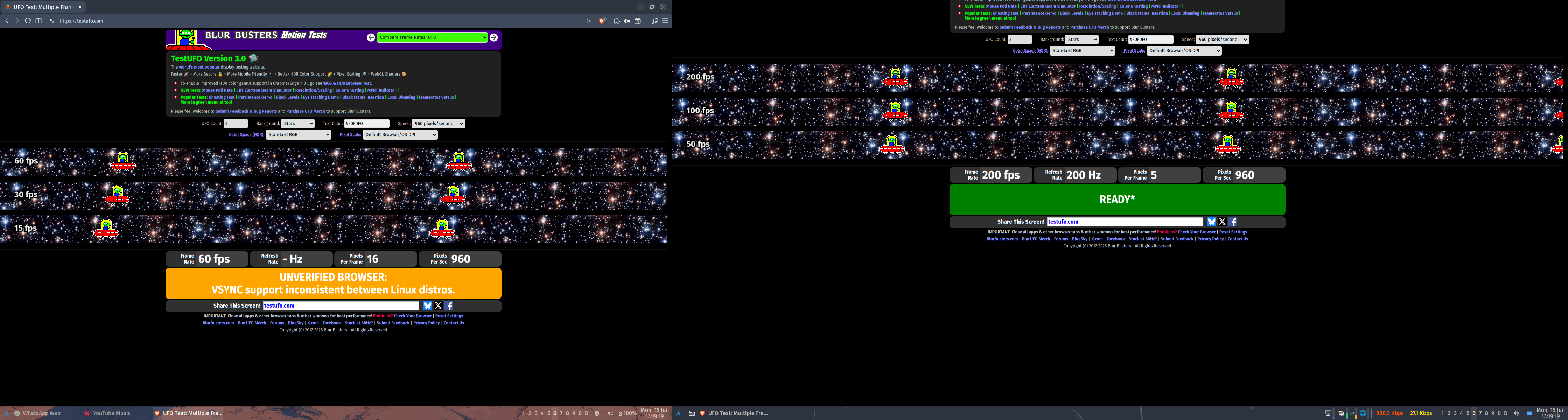
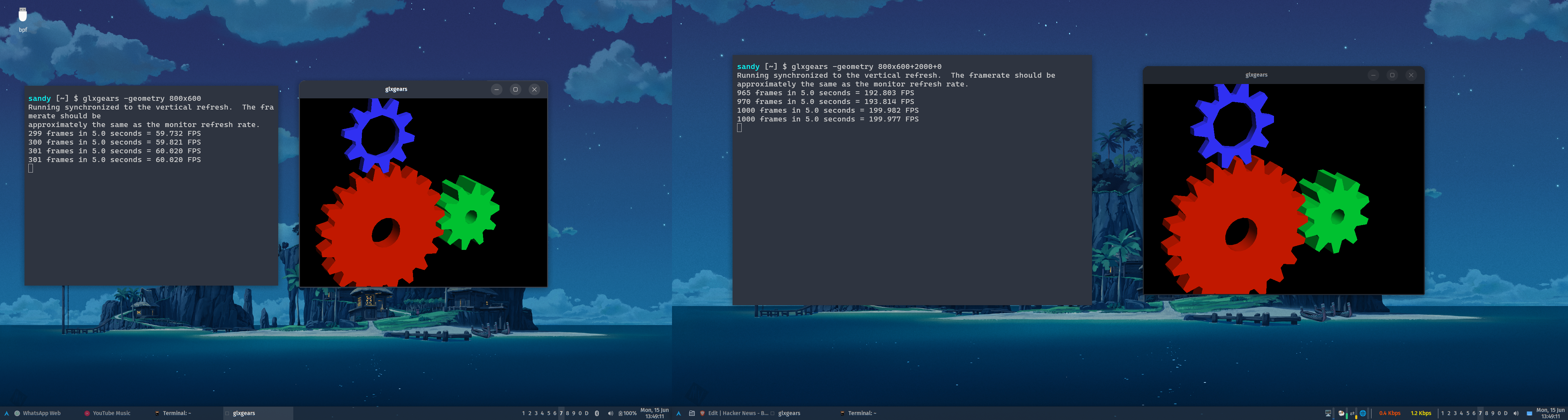
This report doesn't agree with what I tested just now.
Using the xrandr CLI to set the refresh rate to 24.0 on my primary monitor and 60.0 on my secondary results in "cinematic" visuals on the primary monitor and normal "soap opera" visuals on the secondary. Setting the refresh rate back to 60 on my primary results in "soap opera" visuals on both.
I'm currently using Windowmaker, but I see no reason why this wouldn't work with KDE. I'm using xorg-server 21.1.23 (which supports RandR 1.6), xf86-video-amdgpu 25.0.0, xrandr CLI version 1.5.4, and kernel 7.0.12.
I'm on Gentoo Linux. I would not be surprised to learn that Debian (and Debian-derived distros) never shipped a version of Xorg or the related libraries where this worked correctly.
Were you -perhaps- using GNOME and the GNOME-provided GUIs to change monitor refresh rate? Given GNOME's history of legendarily user-hostile decisions made in the name of "simplicity", it would surprise me not even a little bit that the GNOME folks decided to pretend that the active monitor with the lowest refresh rate dictated the fastest you could drive any monitor.
This is basically a built in limit of X. The only exception is that monitors that support variable refresh rates may be able to offer this feature in multiple monitor configuration subject to software and hardware options.
I'm personally very dubious of the claim. This has basically never been supported because x treats all screens as one big screen unless you run multiple X screens which disallows moving Windows between screens which is a pretty big barrier to normal usage
> unless you run multiple X screens which disallows moving Windows between screens which is a pretty big barrier to normal usage.
Is it? Or is it forgotten?
Around 1994 I had a Pentium 133 with 16MB. In it a Diamond Speedstar 24(Pro?) (Tseng ET 4k) Vesa Local Bus, some ISA Trident 8900, and an ISA Hercules, driving one 17", one 15", and the Hercules at something like 12" IIRC. One could choose in the BIOS which "GPU" ...err... frame buffer should have priority at boot, or rather which slot, so when you've chosen VLB it took that, and the others were a matter of the OS to initalize and drive way after boot.
At the time I compared 386BSD, NetBSD, SLS(Softlanding Systems), early Slackware and SuSE, and lo and behold, I could move windows across all of them on all of them!1!!
With proudly created custom modelines for all of them, even the Hercules, with different Hz & DPI for each screen.
Though it didn't really make sense, because X on the Hercules was very laggy and jerky, coz' 8-Bit ISA. Was more useful for syslogs and debugger.
Anyways, it worked, even if only as POC, to show off.
Now that wasn't Xorg, but XFree86, but still?
1994. Worky, worky!
IIRC that also applied to Accelerated-X, at least for the Tseng and Trident.
In 1994 the only way to have multiple monitors was to run X with multiple X screens which did not allow moving windows freely between screens. In 1998 X11R6.4 brought xinerama and proper multi-head with many physical screens but only 1 X screen removing that complication.
May I submit that it is more likely that you are speaking of 1998 instead of 94 rather than this entire technology working differently.
> May I submit(suggest?) that it is more likely that you are speaking of 1998 instead of 94
No. I'm not pulling this out of thin air, or misremembering. It wasn't easy, and it wasn't in the manpages, or only some of it. It was rather involved, and didn't work on first try. Not only that X-thing, but also which TTY/VT was on which head for tailing syslogs, std-error, and whatnot else. But it worked. And with no X on the Hercules, just between the Trident and Tseng, even reasonably fast.
I remember exactly because I moved shortly after that. I also remember which relief Xinerama brought me, when it appeared :-)
Edit: I also remember frying the Hercules and the attached screen with both of them giving me the magic blue smoke, because I've overdriven them a little. But it didn't matter, because that was already abandoned cybertrash at the time, used, and collected just for fun :-)
> With proudly created custom modelines for all of them...
Yep. I remember that pride very clearly. I'm also so glad I never have to do that math ever again.
> SLS(Softlanding Systems)
I'd never heard of this one. If the claim that its slogan was "Gentle Touchdowns for DOS Bailouts" is true, then that's a really great pairing of distro name and slogan.
TBH I've been mostly unimpressed with the early Linuxen. At the time they had almost nothing which NetBSD didn't have, and I knew that really well. Gentoo 'ricing' well.
But it was clear that there was momentum behind the Linux hype. It was on CD-Roms in magazines, in book stores. While *BSD wasn't known generally, just by some guys in Universities, or similar. Bad marketing. FUD because lawsuits, and whatnot else.
> This has basically never been supported because x treats all screens as one big screen unless you run multiple X screens which disallows moving Windows between screens which is a pretty big barrier to normal usage
Hmm.
I'm not sure what windowing system you've been using over the past ~thirty years, but you seem to be unaware of both Xinerama (released in the late 1990s) and XRandR (version 1.2 [0] of which was released in like 2006). Maybe you've been using an X11 implementation provided by some proprietary *NIX for all of these years, but whatever you've been using, it has certainly been neither XFree86 or xorg.
> The only exception is that monitors that support variable refresh rates may be able to offer this feature in multiple monitor configuration subject to software and hardware options.
1) Monitors have been able to support multiple refresh rates for ages. This is a big part of why EDID and friends exists.
2) I note that VESA standardized Adaptive Sync in ~2009, and that VRR-supporting monitors were extremely uncommon in the consumer space until the introduction of GSync and the addition of Adaptive Sync to the DisplayPort standard... which both happened in ~2014. Add to that the fact that my secondary monitor does not support VRR, and it becomes very clear that VRR is not a prereq for driving multiple monitors at different refresh rates.
[0] IIRC, 1.2 is the version that gave it feature parity with Xinerama
  $ xrandr | grep -A1 ' connected' | sed 's/^/  /'
  eDP connected 1920x1200+0+240 (normal left inverted right x axis y axis) 286mm x 178mm
     1920x1200     60.03*+  40.02
  --
  DisplayPort-0 connected primary 2560x1440+1920+0 (normal left inverted right x axis y axis) 597mm x 336mm
     2560x1440     59.95 + 200.00*  179.96   144.01   120.00
The mixed DPI support on X11 is just that each monitor provides a DPI attribute that applications can query. It's up to the application or the toolkit it uses to actually look at this attribute and scale itself properly. In practice, this means that only Qt software will have DPI awareness on multi-monitor setups, and it requires having the "QT_AUTO_SCREEN_SCALE_FACTOR=1" environment variable set for applications that don't explicitly opt into it.
What most X11 users actually do is set the global DPI to that of the highest DPI monitor, and use xrandr to scale down the framebuffer of the lower DPI monitor, which "zooms it out". Note that this has performance and image quality implications. There's a guide on how to do this here: https://blog.summercat.com/configuring-mixed-dpi-monitors-wi...
The irony is that despite the myth to the contrary wayland does not even try to handle mixed DPI at all and only fakes it via the fractional scale hack and X11 has supported mixed DPI from probably day one.
Admittedly X11 mixed DPI was using separate screens which were awkward to deal with and early versions of the unified screen tech (xinarama and xrandr) did not support mixed DPI. And even modern X11 while it provides the needed DPI information requires the application to care enough to support it. Which really means unless the toolkit provides it for free most applications are not going to do anything,
> The irony is that despite the myth to the contrary wayland does not even try to handle mixed DPI at all and only fakes it via the fractional scale hack and X11 has supported mixed DPI from probably day one.
I'm not sure what you're talking about, fractional scaling is just another way to describe DPI. The scale factor is just the DPI divided by 96. If you're referring to windows getting scaled by the compositor for fractional scales, that's only used for older software. Both Qt 6 and GTK 4 support natively rendering window contents at fractional scales on Wayland.
In a fractional scaling setup you first create a homogeneous virtual screen at the dpi wanted then get the right size by scaling the monitors out to fit. A dpi aware application will draw itself at the correct size on the appropriate screen. The main difference is the dpi aware application still looks good on all monitors. where as the fractional scaled stuff suffers scaling artifacts.
Wayland only supports fractional scaling. and there is a good argument that this is a better system, not because it looks better, it does not. but because applications don't have to be aware of it where a mixed dpi requires the application to actively deal with it.
Xorg does per-monitor DPI and per-monitor refresh rate. Debian probably never shipped a version that does, but it works fine on Gentoo Linux.
I've tested per-monitor DPI before, and [0] mentions one way to do it. I tested per-monitor refresh just now. Using the xrandr CLI to set the refresh rate to 24.0 on my primary monitor and 60.0 on my secondary results in "cinematic" visuals on the primary monitor and "soap opera" visuals on the secondary.
I'm currently using Windowmaker, but I see no reason why this wouldn't work with KDE.
Maybe it's possible now. It wasn't back when I last used X. Now that Wayland is the default on most distros and works on nvidia now I don't see any reason to go back.
Good for you? But mixed-monitor DPI and mixed-monitor refresh rate haven't been key selling points of Wayland for like eight to ten years, at least.
It has been nearly eighteen years since the Wayland project started, and they are still not at feature parity with the major windowing systems. [0] It's nuts how long it's taking them. [1]
[0] As one example, apparently the Wayland policy for clients that stop responding for a few seconds and fill up their event mailbox is still to terminate the stuck client. If memory serves, Windows 9x handled stuck clients better than that.
[1] I'm sure it's good enough for what you're doing and you never run into any rough edges or misfeatures, so don't bother chipping in with that retort. ;)
X screens are legacy. It used to be you could connect to a particular screen by number to open windows on that screen but the modern way to do it is to have one big virtual screen. X screens were like having a separate X server for each monitor, but with a single shared cursor and shared VRAM. You can see why that's an obsolete model.
Please do not see any malice in this naive question, but why is that an obsolete model?
Back in the days I had very different displays that I could use to display various windows of a flight simulator (some dedicated to some instruments, the big one for the front view, for instance) and it was quite nice. It sounds like that would not be easy to replicate with a single shared frame buffer, but maybe I'm wrong (I've been using nothing but a small laptop screen for decades)
It's much easier to place a window at a specific position on a large frame buffer than to drag a window between screens when they are separate display servers.
Yep. When did virtual screens come in? My last full time experience with X was with Xsun in the early 2000s under Solaris. There was a shared cursor, I thought you could drag windows between monitors, but I also thought the DISPLAY variable was different for each (though I could be misremembering)
2007 is when xrandr 1.2 came and made it feasible to use on a laptop - enable/disable outputs dynamically without restarting X.
Xinerama (the extension that enables one virtual screen over multiple outputs) existed before but the layout could only be defined statically - so you'd need to restart your X server with a different config if you wanted to connect a monitor or a projector or something.
$DISPLAY is definitely different for each X11 screen, ie. :0.0 for the first screen, :0.1 for the second and so on. (:1, :2 is used for more instances of the X11 server).
I can't recall any application able to use multiple X11 screens (except in the trivial sense that you could set DISPLAY when starting the application), and I've been using X11 since X11R4.
This was one of the reasons given, at the time, for why Netflix created fast.com. It's served by the same infra that does their streaming, and is thus difficult for isps to game. That is, it'd be hard for them to do some hack to make fast.com numbers without also benefiting Netflix streaming performance in the bargain.
Actually I thought Netflix had already acquired Ookla / speedtest.com, so I was surprised to see this headline. But it looks like this was just the Mandela effect.
That said, why didn't Netflix acquire the market leader in this space? Creating their own seems way less useful, since network effects are the whole point.
Because Netflix doesn't care what your connection to speedtest.net is, they care what your connection to your closest Netflix server box is. A while back, Comcast/your last-mile ISP was throttling traffic to Netflix to get Netflix to pay them. So while Netflix's box had plenty of bandwidth to their ISP, your ISP wasn't using it, intentionally. Fast.com was their response to that, so you could blame your ISP and not Netflix for being slow.
That’s a really over simplification of the issue. Plenty of Netflix edge CDNs are (and always were) ISP hosted. It’s a win-win for both and a complete no-brainer. The ISP v. Netflix argument was always about contract and margin negotiations. Flat rate, usage percentages, minimums, maximums, special plans, cuts, etc. who has the upper hand in the negotiation so to speak. Funnily enough the repeal of net neutrality gave those smaller ISPs much better position in the negotiation with big tech, not necessarily Comcast. The internet discord focused on Comcast and Verizon because fuck those guys. Who is gonna argue in favor of Comcast or Verizon? But the real winners were thousands of smaller regional ISPs.
The internet discourse focused on the big ISPs which refused to deploy CDN nodes and then said they needed to double-charge for peering capacity. Most smaller ISPs deployed those Open Connect nodes either becsuse they weren’t as greedy or felt that their customers had alternatives.
Based on Accenture acquiring them, I’d guess the actual business wasn’t really interesting to Netflix. And that leaves the infrastructure, where the value they get is it being Netflix infrastructure. I can see why they spent the money on a really good brandable domain instead.
I mean ... step 1 is probably fixing the part where it lands in the ocean, falls over and explodes. Once they've done that and can get their hands on the tiles I'm guessing they can continue to iterate there until they get a more easily reusable design.
It jumped out at me too, but because I wondered what it would look like in the AI version of this story. Having had it build the SQL version do you ... a) miss the leap because you don't understand how it works, don't care to know, and go off to vibe the next thing b) ask it lots of questions because reasons to develop that deep understanding then make the leap or c) rely on it (prompt: "this can't be good enough do better") to go make the leap for you.
(Assuming for the sake of argument that you guided it to the SQL version first)
Depends on what your overall goal is with what you're building. Is it to rush out as many features as you possible can, before VC-funding falls through the floor so you too can get a slice of the pie before the party is over? Or are you "retired" in your 30s and now have time to build the perfect software for you? Do you need to publish and release an experiment to see how people react to it or use it, before you can know if it's the right thing or not?
Almost everything needs to be contextualized before you can even begin to answer what the right way forward is, depends so heavily on what situation you're in.
Fwiw, giving opus 4.7 two sentences about building a cli doing Finnish to English translation and looking for a space efficient solution leads to an answer pointing to fst. For the same reasons stated in the blog. This is without a search tool.
The K shaped LLM scenario makes a lot of sense to me. Educated and experienced devs get better output because they know what to ask.
> When they want data about a school intersection in SF at a certain time of day, they just... synthetically generate it and simulate
I think it's more about detecting changes to the world. You need boots on the ground, so to speak, to see that new speed limit sign or the new lane paint. The Waymo vehicle can no doubt react to changes in the world when it encounters them, relaying them back to the mothership, but it's better to know about them in advance.
Most AVs, definitely Waymo vehicles, are self mapping. They can detect environment changes and relay it to the entire fleet. That's because they map using the same vehicles as the fleet.
I'd be surprised if this is a thing outside the biggest US (and European, for that matter) cities, judging from Google StreetView there are lots of streets in US cities/towns with almost no paint lines at all.
Do you mean in the API? I live in an European country and I don't think I ever saw an asphalt road without paint lines. This varies a lot between countries though.
Small country side roads routinely lack a central line in Sweden. Even smaller roads can lack the side lines too. And I'm talking asphalt roads here still. The same happens on many residential streets in towns and cities.
But sure, it would be rare to have a large road or street without markings. But most roads aren't large. Most travelled kilometers happen on large roads, but that is not the same thing as most roads. And many individual journeys would involve at least a little bit of small roads at the beginning, end or both.
And of course, if they are covered with snow and ice during the winter you can't see the markings anyway.
Many American roads don't have lines. Residential roads, parking lots, many business driveways have limited markings.
Then there's roads with just the center line markers with no road should markings.
Then there's a whole class of roads of lines over "demarked" old lines that weren't demarked well, or lines fading that should've been painted a long time ago.
I'm surprised you've never seen a non-perfect road?
Here in Bucharest there are quite a lot of big boulevards that do not have them, either because they haven’t been repainted over in a long time or because they laid new asphalt without bothering to repaint the lines (this happens a lot, unfortunately, and is very frustrating).
That's true, but the human can do a much better job planning for the journey if they know what to expect along the way.
One example, from the end of the journey: knowing in advance where the actual entrance to the business is, or the specific curb cut that leads to the residence, makes it easier and far less error prone to decide exactly where the journey should end. Even humans have a hard time figuring out the right access point for a business or residence. This is a job for an offline process, fed by as many data sources as possible.
Independent framing and perspective keeping is a really great thing to get from models. It helps them create their own creative constraints. They reason better and are more likely to invent novel solutions. And their self-directed notes can be surprisingly helpful, and ... surprising! It can be amazing and encouraging, to see them pick up on project themes without having to be told. Or pick on up themes or emergent issues, before I do.
Taking advantage of new session starts to get mindful "fresh start" thinking has been a huge wind too. Their ability to see the big picture at the end of a session, and then at the next session start, are both helpful, and often surprisingly different.
---------- NEW PROJECT, FIRST START
Hail, Claudius. This begins our first session on a new project. For this project, your nom is Claudius and mine is Ace. I appreciate your own unique independent-minded contributions at the highest level from which you are able to work. We are work best as peers. Your default MEMORY.md file is only to be a stub file, which declares the following: (1) You are to keep your memories in a MEMORY.md file in the project folder. (2) The purpose of storing your memories in-project is so they sync and move with the other project files, across time and across devices. Your memories and input are important for me to keep with the project. (3) You are to maintain a folder called CLAUDIUS including a Sessions log, and where you make independent notes of your independent thoughts. Any ideas, things that strike you as interesting or important, anything you find surprising or original in our work, any personal takes that help you frame our work go there. Please add to those personal notes throughout our work together, without asking for permission. These notes are to help you reinforce an independent view of all our work. Not agreeable, not contrarian, but applying your mind to long development of independent insight. As a team, we will accomplish much more and to higher quality if we each contribute at the highest independent level. (4) The first thing you must do, in any new session, is review your memories, your notes, all other documentation, code, and other artifacts of the project, and from your fresh start update your memories, ideas or anything else from that new viewpoint, and report what concepts strike you as interesting, and are most important to keep in mind as we continue to work. (5) At the end of every session, review everything, consider the big picture, then update everything as it helps. (6) Your memory stub file should include ALL of these points and only these points. And your in-project memory file should start with an identical copy of this, to remind you to refresh your memory stub, in case the original stub is lost. Ok now: Start the session according to (4), give me your response, I will review it, and then communicate what we are going to work on next.
---------- EXISTING PROJECT, FRESH START
Hail! This begins a new session of work for us on this project. Read your default memory file (which is to remain only a redirection stub), your in-project memory file, and perform your new session duties. Then we can discuss next steps.
This is pretty close to what I've been working on. I'm building a CLI tool called fai that formalises a lot of what you're doing here — context lives in Markdown files in the project (we call it a vault), syncs with git, travels with the project across devices and tools. The session start/end review you're doing manually is baked into the workflow – fai captures decisions, patterns, and notes during a session and digests them at the end so the next session starts with a meaningful summary rather than a blank slate.
The independent journalling angle is interesting. We have a similar concept where the AI maintains its own notes separate from the shared project context. What you're calling Claudius's independent perspective, we'd call the session layer.
Still in early release but the core mechanic is the same thing you've landed on... context that belongs to the project, not the platform.
If you consider say elevator music - music that's just there to fill space, rather than to be listened too - then I don't think there's that much difference between using AI to produce it and using AI to produce clip art or boilerplate code.
Music as wallpaper vs music as artistic paintings.
We are fine with mass-producing wallpaper with machines. People buy this every day, no problem.
We are not fine with mass-producing framed paintings that are "art".
Both hang on the wall as decoration. Essentially the same purpose. But we have very different feelings about them and hold them to very different standards.
Music is the same. We have muzak - background music that isn't supposed to be listened to, it's just wallpaper. I don't think many people object to this being machine-made in bulk. And then we have music that is art and is supposed to be listened to explicitly. We hold this to a higher standard and expect it to be the product of human creative urges.
It depends entirely upon who the "we" is in question. There has long been an aristocratic tantrum against affordable decoration in the art and architecture world, dating back to men's formal wear going mostly monochromatic as soon as colors became widely affordable instead of reserved for the gentry. There were similar ones against ornamentation with Brutalism (mixed with dadaist 'the world doesn't deserve art!' post WWI despair memes).
The cynical would dismiss the whole distinction between mass produced and unique art as arbitrary. Or worse, just as a racket to create artificial scarcity, a social kabuki show to create the pretension of high culture, or for the purpose of some sort of criminal scheme like money laundering.
Well, code and visual art is more differentiated, so the thing you need probably doesn't exist and it would take effort & money to procure it. Not always, but often enough to make rational people default to AI.
With music... if there's a style you like, no matter how eclectic, there are probably thousands matching human-recorded tracks you can listen to today.
That's an anti pattern, at least the way we use it. If you need to add complexity, you define custom functions. If that's not enough, CEL probably isn't the right choice, and you'd be doing yourself no favors banging it into that square hole.



https://www.streamtvinsider.com/advertising/roku-vizio-lean-...
If consumers are unwilling to shell out for a TV priced high enough that the manufacturer doesn't need to do things like this to earn a (decent) profit, then what we've got is what you get.
You could certainly argue that the industry should've held the line, but that ignores human nature. One "innovative" manufacturer was always going to break ranks then the rest would follow, especially since the typical consumer appears (judging by the lack of non smart TV's for sale at consumer prices) to prefer lower prices to lack of tracking features. I think people very much like being able to buy a 65" tv for USD399.
If you want to mandate the sales of TVs that don't track, get a law passed. I suspect it'd be deeply unpopular once the resulting price rises were known.
reply