  <<<<<<< left
  ||||||| base
  def calculate(x):
      a = x * 2
      b = a + 1
      return b
  =======
  def calculate(x):
      a = x * 2
      logger.debug(f"a={a}")
      b = a + 1
      return b
  >>>>>>> right
With this configuration, a developer reading the raw conflict markers could infer the same information provided by Manyana’s conflict markers: that the right side added the logging line.
That still have an issue with the vocabulary. Things like "theirs/our" is still out of touch but it's already better than a loose spatial analogy on some representation of the DAG.
Something like base, that is "common base", looks far more apt to my mind. In the same vein, endogenous/exogenous would be far more precise, or at least aligned with the concern at stake. Maybe "local/alien" might be a less pompous vocabulary to convey the same idea.
I'll be honest, as a fairly skilled and experienced programmer who isn't a git expert, I know what HEAD means, but when I'm rebasing I really have no idea. It all seems to work out in the end because my collaborative work is simple and usually 2–3 people only, so I'm never rebasing against a ton of commits I lack context for (because 90% of them are my commits since I'm usually dealing with PRs to my open source projects rather than someone else's).
HEAD is "the thing we're editing now" but that's not terribly useful when rebasing since you're repeatedly editing a fake history.
Git leaks a lot of implementation details into its UX. Rebasing is meant to be equivalent to checking out the "base" branch and cherry picking commits onto it. Therefore "ours" during a rebase is the base branch.
The meaning of "ours" and "theirs" is always the same, but the "base" of the operation is reversed compared to what you might be used to during merge.
Rebasing can be confusing and hard and messy, but once I learned that rule and took the time to internalize it, I at least never got confused on this particular detail again.
> fake history
That's the thing, it's not actually fake history. Git really is doing the things it looks like it's doing during a rebase. That's why you can do all kinds of weird tricks like stopping in the middle to reset back a commit in order to make a new intervening commit. The reason you can abort at any time with (almost) no risk is because the old history is still hanging around in the database and won't be removed until GC runs, usually long after the rebase is settled.
Learning git properly is pretty much "read Git book at least 3 times".
All of it makes sense and is decently intuitive once you know how internals work.
People keep imagining git as a series of diffs while in reality it's series of the filesystem tree snapshots + a bunch of tools to manage that and reconcile changes in face of merge. And most of that can be replaced if the builtins are not up to task. And the experience is getting slowly better but it's balance between power users and newbies, and also trying to not break stuff when going forward.
Now of course that sucks if programming is not someone's day job but there is plenty of tools that present simpler workflows built on top of that.
Also git store (almost?) all its operations in the reflog. They have identifier like commits so you can reset to them and restore the original state of the working directory (mostly after an automatic rebase gone wrong).
That's the thing, they're not "like commits", they are the actual original commits. It's a history of where the HEAD ref used to be. Eventually those commits will be pruned out of the tree if/when the reflog expires because there is nothing left pointing to them. But otherwise they are normal commits.
It's interesting that once even C programmers, like Linus, become really experienced, they embrace the wisdom that functional programmers are forced to swallow anyway.
> HEAD is "the thing we're editing now" but that's not terribly useful when rebasing since you're repeatedly editing a fake history.
You got two things wrong here. Firstly, HEAD isn't 'the thing you're editing now'. HEAD is what you have already committed. If you want to edit the HEAD, you have to either amend the commit or reset and redo the commit. (To make the situation even more complex, the amended or overridden commit remains in the repo unchanged, but orphaned.)
The actual thing being edited is a 'patch' that will eventually be converted into a new commit (snapshot). If you're doing a rebase and want to see the next patch in the pipeline that you're editing now, try this:
git rebase --show-current-patch
Secondly, rebase is not editing a fake history. Rebase is creating a new (and real) history by repeatedly cherry picking commits from the old history based on the rebase plan. HEAD is the tip commit of the new history under construction. On completion of the rebase, the branch ref of the old history is switched to the new history, where HEAD is now at. Meanwhile, the old history remains in the repo unchanged, but again orphaned.
All the orphaned commits are still visible in the HEAD's reflog. You can use it to undo the rebase if you wish.
I agree that the entire thing is confusing as hell. But I have a bunch of aliases and scripts that show you the process graphically in realtime. You can use that awareness to make the right call every time. I'm thinking about converting it into a TUI application and publishing it.
Seriously! I have too many years of software development experience, but I use Visual Studio UX to handle pretty much all git operations. And always merge.
I have better things to do in my life than "internalizing" anything that doesn't matter in the grand scheme of things.
I don’t like that approach, because people who work like that commit all kind of crap to repo or cry that GIT ate their homework…
Then we have line ending conflicts, file format conflict UTF8-BOM mixes with just UTF8 it makes more work for everyone like crappy PRs. Because of people for who those are things that „don’t matter in grand scheme of things”.
Hey not every rebase has conflicts. I definitely rebase when there are no conflicts, then merge.
When there are conflicts I merge „theirs” into my branch to resolve those so I keep mental model for this side and don’t have to switch. Then rebase then open PR.
I do the following to keep my sanity when doing something like rebasing a feature branch onto latest origin/master:
* First and most important: turn on rerere.
* Second: merge and resolve all conflicts, commit.
* Third: rebase.
The second step might look redundant, but thanks to rerere git remembers the merge conflict resolution. That makes step 3 have fewer conflicts; and step 2 tends to be easier on me, because we are only reconciling the final outcomes.
(Well, I'm lying: the above is what I used to do. Nowadays I let Claude handle that, and only intervene when it gets too complicated for the bot.)
This is one of my pain points, and one time I googled and got the real answer (which is why it's such a pain point).
That answer is "It depends on the context"
> The reason the "ours" and "theirs" notions get swapped around during rebase is that rebase works by doing a series of cherry-picks, into an anonymous branch (detached HEAD mode). The target branch is the anonymous branch, and the merge-from branch is your original (pre-rebase) branch: so "--ours" means the anonymous one rebase is building while "--theirs" means "our branch being rebased".[0]
I ended up creating a personal vim plugin for merges one night because of a frustrating merge experience and never being able to remember what is what. It presents just two diff panes at top to reduce the cognitive load and a navigation list in a third split below to switch between diffs or final buffer (local/remote, base/local, base/remote and final). The list has branch names next to local/remote so you always know what is what. And most of the time the local/remote diff is what I am interested in so that’s what it shows first.
Let’s see if I get this wrong after 25 years of git:
ours means what is in my local codebase.
theirs means what is being merged into my local codebase.
I find it best to avoid merge conflicts than to try to resolve them. Strategies that keep branches short lived and frequently merging main into them helps a lot.
"Ours" and "theirs" make sense in most cases (since "ours" refers to the HEAD you're merging into).
Rebases are the sole exception (in typical use) because ours/theirs is reversed, since you're merging HEAD into the other branch. Personally, I prefer merge commits over rebases if possible; they make PRs harder for others to review by breaking the "see changes since last review" feature. Git generally works better without rebases and squash commits.
Wow, interesting to see such a diametrically opposed view. We’ve banned merge commits internally and our entire workflow is rebase driven. Generally, I find that rebases are far better at keeping Git history clean and clearly allowing you to see the diff between the base you’re merging into and the changes you’ve made.
"Clean" is not the same as "useful". You have to be really, really disciplined to not make a superficially looking "clean" history which may appear linear but which is actually total nonsense.
For example, if one is frequently doing "fix after rebase" commits, then they are doing it wrong and are making a history which is much less useful than a seemingly more complicated merge based history. Rebased histories are only clean if they also tell a true story after the rebase, but if you push "rebase fixes" onto the end of your history, then it means that prior rebased commits no longer make any sense because they e.g. use APIs that aren't actually there. Giving up and squashing everything to one commit is almost better in this case because it at least won't throw off someone who is trying to make sense of the history in the future.
I think that rebasing has won over merges mostly because the tools for navigating git histories suck SO HARD. I have used Perforce at a previous job, and their graphical tools for navigating a merge based history are excellent and were really useful for doing code archeology.
Generally our pattern is that every PR gets rebased into sensible commits. So in a way we are doing "squash commits" but the method is an interactive rebase. This keeps our history very pretty and clean, and simultaneously easy to grok and navigate.
Yes, I prefer that approach as well because it allows the person who authored the change to do all the work of deciding how to resolve conflicts up front (and allows reviewers to review that conflict resolution) instead of forcing whoever eventually does the merge to figure everything out after the fact. It also removes conflicts from the history so you never have to think about them later after the rebase/merge process is finished.
I don't know. Even when I'm working on my own private repositories across several machines, I really, really dislike regular merges. You get an ugly commit message and I can never get git log to show me the information I actually want to see.
For me, rebasing is the simplest and easiest to understand, and it allows you to squash some of your commits so that it's one commit per feature / bug-fix / logical unit of work. I'll also frequently rebase and squash commits in my work branch too, where I've temporarily committed something and then fixed a bug before it's been pushed into main, I'll just reorder and squash the relevant commits into one.
I completely agree, since doing rebase our history looks fantastic and it makes finding things, cherrypicking and generating changelogs really simple. Why not be neat, it's cost us nothing and you can make yourself a tutorial on Claude if you don't understand rebasing pretty easily.
The thing is, you'll typically switch to master to merge your own branch. This makes your own branch 'theirs', which is where the confusion comes from.
Not me. I typically merge main onto a feature branch where all the conflicts are resolved in a sane way. Then I checkout main and merge the feature branch into it with no conflicts.
As a bonus I can then also merge the feature branch into main as a squash commit, ditching the history of a feature branch for one large commit that implements the feature. There is no point in having half implemented and/or buggy commits from the feature branch clogging up my main history. Nobody should ever need to revert main to that state and if I really really need to look at that particular code commit I can still find it in the feature branch history.
This is what I do, and I was taught by an experienced Git user over a decade ago. I've been doing it ever since. All my merges into main are fast forwards.
Since it's always one person doing a merge, why isn't it "mine" instead of "ours"? There aren't five of us at my computer collaboratively merging in a PR. There is one person doing it.
"Ours" makes it sound like some branch everyone who's working on the repo already has access to, not the active branch on my machine.
I always checkout the branch I am merging something into. I was vaguely aware I could have main checked out but merge foo into bar but have never once done that.
I have met more than one person who would doggedly tolerate rebase, not even using rerere, instead of doing a simple ‘git merge --no-ff’ to one-shot it, not understanding that rebase touches every commit in the diff between main and not simply the latest change on HEAD.
Not a problem if you are a purist on linear history.
I was wondering when someone was going to point it out. I actually have only been using it since about 2009 after a brief flirtation with SVN and a horrible breakup with CVS.
I was thinking about creating a TUI application that points out what each part in the conflict indicator corresponds to. This idea is primarily meant for rebases where the HEAD and the ID of the updated commits change constantly. Think of it as a map view of the rebase process, that improves your situational awareness by presenting all the relevant information simultaneously. That could trivially work for merges too.
iirc ours is always the commit the merge is starting from. the issue is that with a merge your current commit is the merging commit while with a rebase it is reversed.
I suspect that this could be because the rebase command is implemented as a serie of merges/cherry-picks from the target branch.
Now git takes main and starts cloning (cherry-picking, as you said) commits from mybranch on top of it. From git's viewpoint it's working on top of main, so if a conflict occurs, main is "ours" and mybranch is "theirs". But from your viewpoint you're still on mybranch, and indeed are left on mybranch when the rebase is complete. (It's a different mybranch, of course; once the rebase is completed, git moves mybranch to point to the new (detached) HEAD.) Which makes "ours" and "theirs" exactly the opposite of what the user expects.
It will checkout origin/master and replay the current branch on top.
P.S. I had to check the man page as I use Magit. In the latter I tap r, then u. In magit my upstream is usually the main trunk. You can also tap e instead of u to choose the base branch.
>Maybe "local/alien" might be a less pompous vocabulary to convey the same idea.
That is more alien and just as contrived. If you merge branches that you made, they're both local and "ours". You just have to remember that "ours" is the branch you are on, and "theirs" is the other one. I have no idea what happens in an octopus merge but anyway, the option exists to show commit titles along with markers to help you keep it straight.
Something that carry the meaning "the branch we want to use as a starting point" and "the other branch we want to integrate in the previous one" is what I had in mind, but it might not fit all situations in git merge/rebase.
Assuming you have to start on one of the branches being merged, "current" is a good name for the one you started on. "Other" is good enough for the other one. By the way I found out that octopus merges never succeed in case of conflicts. I'm not even sure if prerecorded resolutions work in that case. You're supposed to do a series of normal merges instead if you have conflicts.
This is better but it still doesn't really help when the conflict is 1000 lines and one side changed one character and the other deleted the whole thing. That isn't theoretical - it happens quite regularly.
What you really need is the ability to diff the base and "ours" or "theirs". I've found most different UIs can't do this. VSCode can, but it's difficult to get to.
I haven't tried p4merge though - if it can do that I'm sold!
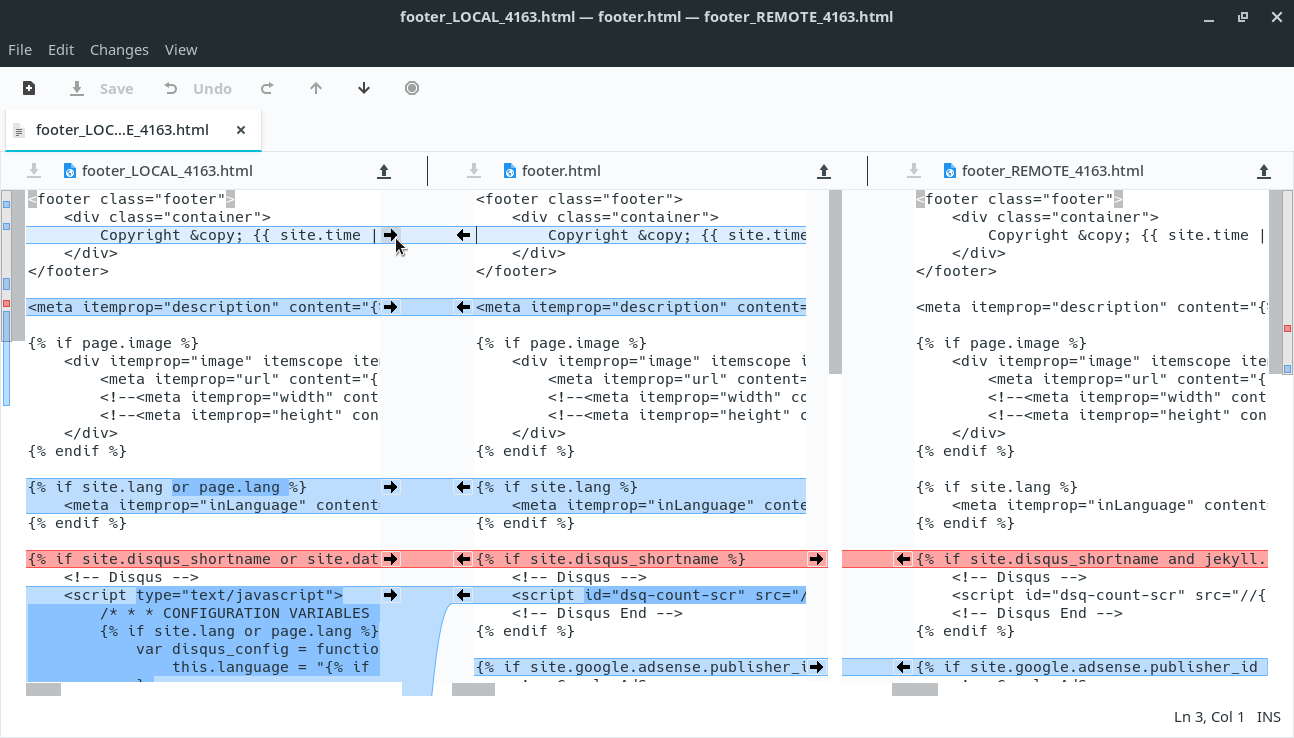
If I understood your point correctly, I believe that Meld can do that. And then you get a windows as [1]. You can configure git to choose which version goes where. Something like:
So the way you can do it in VSCode is to open the conflict in their smart merge editor... Often it is actually smart enough to highlight the relevant change but if not each of the left/right editors has a button in its toolbar to diff it against the base.
Not the easiest to access but better than copying/pasting (which is what I also used to do).
I'm on my phone right now so I'm not going to dig too hard for this, but you can also configure a "merge tool" (or something like that) so you can use Meld or Kompare to make the process easier. This has helped me in a pinch to work out some confusing merge conflicts.
I've trained myself to avoid this entirely by avoiding changing lines unnecessarily. With LLMs, I also force them to stay concise and ONLY change what is absolutely necessary.
Did you know that VS Code added support for the same four-pane view as p4merge years ago? I used p4merge as my merge tool for a long time, but I switched to VS Code when I discovered that, as VS Code’s syntax highlighting and text editing features are much better than p4merge’s.
I also use the merge tool of JetBrains IDEs such as IntelliJ IDEA (https://www.jetbrains.com/help/idea/resolve-conflicts.html#r...) when working in those IDEs. It uses a three-pane view, not a four-pane view, but there is a menu that allows you to easily open a comparison between any two of the four versions of the file in a new window, so I find it similarly efficient.
The whitepaper says that the benchmark counted accessibility problems using the tool axe-core (https://github.com/dequelabs/axe-core). It’s too bad that neither the site nor the paper contains any examples of an LLM output and its list of detected problems. I am curious about these aspects:
• Which groups of users are most affected by those rule violations (e.g. blind users or deaf users)
• Whether it’s likely that I unintentionally violate those same rules in web pages I write
Examples of rule violations and statistics on most-violated rules would make the website more convincing by showing that the detected accessibility errors reflect real problems. It would rule out that the only detected error was a single noisy false positive rule in axe-core. I bet that most readers are not familiar enough with axe-core to trust that it has no false positive rules.
The section “Utility Classes: Yes, They Still Exist” is unfair in its comparison of Tailwind with pure CSS. It doesn’t take into account Tailwind’s recommendation in https://tailwindcss.com/docs/styling-with-utility-classes#us... that “if you need to reuse some styles across multiple files, the best strategy is to create a component” in your front-end framework or templating language. So its example of a “typical Tailwind component” is incomplete.
A better comparison would use, for example, a React component:
This would counter all of the article’s arguments in favor of pure CSS. If the website used a `Button` component like this, it would also be true that the “HTML stays readable”, that “changes cascade”, that “variants compose”, and that “media queries live with components”.
A better argument against Tailwind would be the added complexity of having a build system and a front-end framework or templating language, if your project doesn’t already have those for other reasons.
Jujutsu’s changelog (https://jj-vcs.github.io/jj/latest/changelog/) goes all the way back to 2022 and shows there was a release as recently as two weeks ago. I don’t see why the maintainers would stop at this point.
> I (Martin von Zweigbergk, martinvonz@google.com) started Jujutsu as a hobby project in late 2019, and it has evolved into my full-time project at Google, with several other Googlers (now) assisting development in various capacities.


reply